
The Sites Dashboard was created to give you a bird’s eye view of the security and performance across all the sites you manage, regardless of host.
In the Sites Dashboard, you can view:
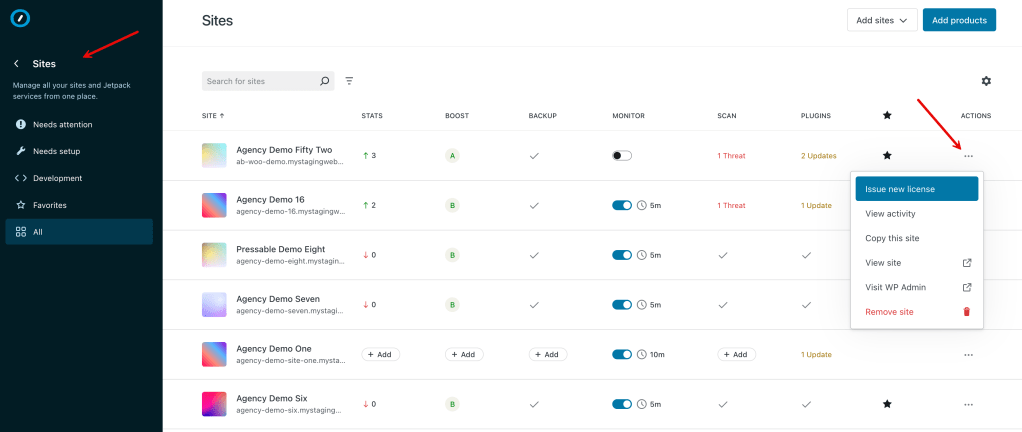
- Stats: This shows traffic insights for the last 7 days. Requires Jetpack Stats, which is free for non-commercial use.
- Boost score: This score is a summary of your site performance across desktop and mobile devices. Additionally, it allows you to add Jetpack Boost to new sites without ever leaving the dashboard. Install the Jetpack Boost plugin within your WordPress site for the best experience. Both free and paid options are available.
- Backup: This column allows you to see the status of backups on each of your sites and add Jetpack VaultPress Backup licenses to sites that don’t have backups. This is a paid service for sites hosted outside of Pressable or WordPress.com. See the marketplace to learn more.
- Scan: This column allows you to see if a site has a security threat detected by Jetpack Scan. When a threat is found, the cell will highlight this and list the number of threats on the site. Clicking on found threats takes you to the Jetpack Scan dashboard so you can address them. Learn how to fix found threats. This is a paid service for sites hosted outside of Pressable or WordPress.com. See the marketplace to learn more.
- Monitor: This column allows you to turn Downtime Monitoring on and off, adjust monitoring frequency, and set how you would like to receive downtime notifications (email or via mobile push). Free.
- Plugins: This column allows you to see which sites have plugins that need updating. Clicking in this column will take you to the plugin management for that site in WP Admin. In the future, you’ll be able to manage your plugins right here. Alternatively, if you have WordPress.com or Pressable plans, you can manage all your plugins on those respective dashboards.
- Favorites: Favoriting sites allows you to identify sites that may need extra attention. By favoriting them, you can toggle to the Favorites view of the dashboard and see only those sites right away.
- Development: Un-launched sites associated with a free development license.
Automattic for Agencies can show sites you own at any host, including WordPress.com or Pressable.
You can also purchase new WordPress.com and Pressable hosted sites, which will show on the Sites Dashboard.
For each site, there is a three-dot menu at the end of the row. This menu allows you to access additional settings, visit WP Admin, and more.
Clicking on any of the feature columns within the Sites table will open the detail panel. Allowing you to get more detailed information for each specific feature or product you’ve enabled, including:
- Hosting level information: PHP version, WordPress version, and site status.
- More detailed performance info from Boost, including the mobile and desktop scores.
- The full Jetpack VaultPress Backup experience.
- The full Jetpack Scan experience.
- More detailed uptime information (over the past 20 days).
- More detailed Stats information.
- The Jetpack Activity log for the site.
Multisites aren’t supported as many features/products are incompatible with multisite installations.
However, if you install and activate the Automattic for Agencies plugin on each site individually, the sites will appear in the dashboard.
We’ll update this section as additional multisite support and features become available.
 Automattic for Agencies - Knowledge Base