
This guide explains how agencies can buy hosting in bulk from Automattic for Agencies. If you wish to refer a client to our hosting, you can follow our guide to making referrals.
Automattic for Agencies offers bulk purchase options for hosting from WordPress.com and Pressable. This guide covers how to purchase hosting from Pressable and how to set up a new site.
Pressable’s hosting is purchased as either a single site or in bundles of 5-500 sites, with larger custom bundles available. Billing is per bundle of sites rather than per individual site, and each bundle has unique traffic and storage limits that increase in line with the number of sites in the bundle.
Pressable plans purchased through Automattic for Agencies also include unique agency perks:
- A Jetpack Complete license for each site.
- Free access to Pressable’s Plugin Management feature.
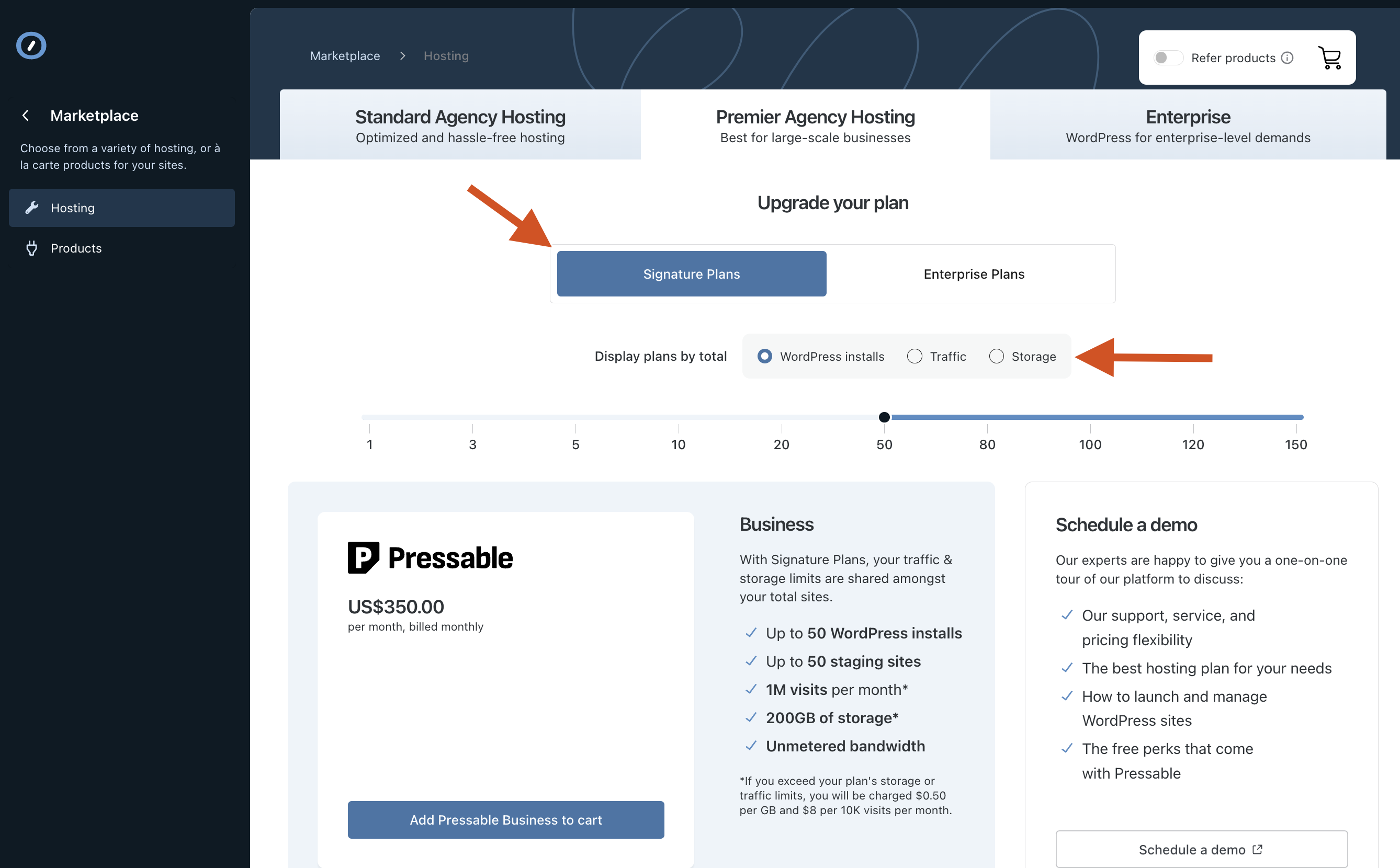
- To get started with Pressable hosting, navigate to the Marketplace > Hosting page on the Automattic for Agencies dashboard and choose the ‘Premier Agency Hosting’ tab.
- Choose between Signature (1-150 sites) and Enterprise plans (200+ sites), and whether you want to filter and choose your plan based on number of WordPress Installs, Traffic, or Storage.
- Use the slider to choose the bundle you wish to purchase and click ‘Select this Plan’ to add to your cart.
- Click the cart icon in the top right to go to checkout and complete the purchase.
Note: you will not be charged immediately for this purchase. We issue an invoice on the 1st of each month for your usage during the prior month. This is when you are charged.
Once you complete the purchase, you’re able to create new sites via Pressable using the licenses that were issued to you. To create a new site at Pressable:
- Navigate to Purchases > Licenses
- Click ‘Manage in Pressable`
- Approve the connection between your Automattic for Agencies account and Pressable


- From Pressable’s Control Panel, you can add a new site using the ‘Add Site’ option in the top left of your screen

Each Pressable site purchased through Automattic for Agencies includes a free Jetpack Complete license, which provides access to security tools, backups, AI tools, and more.
To set up Jetpack Complete on your newly created Pressable site, you can follow this guide from Pressable. Because Pressable plan purchases outside of Automattic for Agencies include Jetpack Security rather than the full Jetpack Complete license you receive as part of our agency program, the guide covers Jetpack Security. However, the same steps also apply to Jetpack Complete.
Each Pressable site purchased through Automattic for Agencies includes free access to Pressable’s Plugin Management feature. If you wish to set up scheduled updates, which include tests on a staging environment, you can follow this guide.
Each Pressable plan has a monthly allocation of storage and visits. This increases with the number of sites in your plan.
Our traffic and storage limits are soft caps, and we do not restrict service if you exceed them. If your site does exceed the included limits, we will add the following charges to your invoice for the month in which those overages occurred:
Storage: $0.50 per GB of storage over the included amount.
Visits: $8 per 10,000 visits over the included amount.
We send notifications by email when your plan is approaching and exceeds the included storage and traffic limits so that you can decide if you prefer to upgrade to a higher tier plan with greater limits or simply be billed for the overages on your next monthly invoice.
Pressable includes other features such as adding collaborators, configuring user reports, and an API for site and user management. Pressable has a full knowledge base available from https://pressable.com/knowledgebase/.
 Automattic for Agencies - Knowledge Base